The Oxygen Design
Iteration 1
The video above demonstrates the first iteration oxygen system made in Unreal Engine 5.
Note: OxygenPerSegment has been set to a very low value for demonstration purposes.
Below is the design document for that system:
1 Summary
The oxygen system is vital in supporting the core tension and enabling progression, as it limits how much time the player can spend exploring per trip out of the station, giving consequence to using lower power levels and therefore lower speeds.
- The player’s sub has a limited oxygen supply.
- When this oxygen supply runs out, they will die.
- Oxygen is represented in segments rather than as a current percentage to allow the player to feel more free to explore without a constantly ticking clock adding extra time-based stress and stealing their focus.
- The player will see how much oxygen they have left via a segmented progress bar on the HUD.
- The player will receive UI and SFX feedback as their oxygen decreases, with certain thresholds triggering standard or critical warnings.
2 Feature Breakdown
2.1 Oxygen Supply
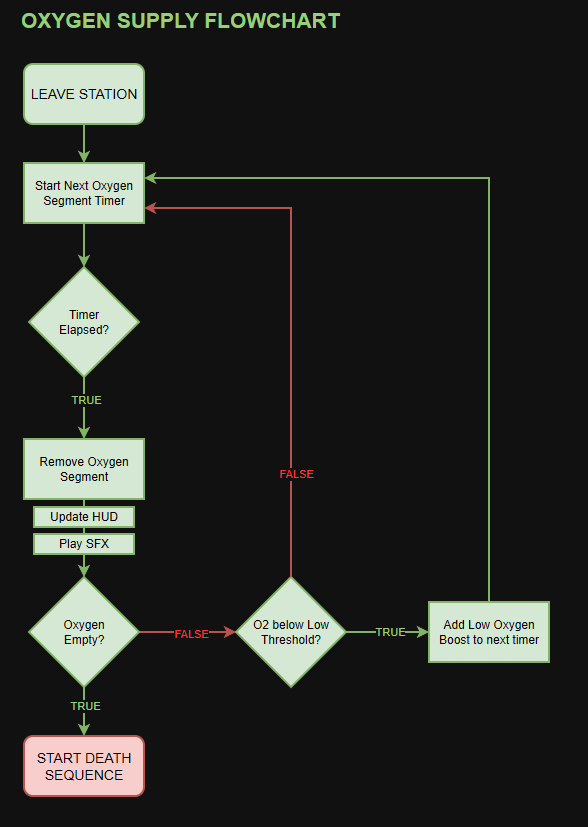
The player’s oxygen supply is segmented, with each segment lasting a set amount of time.
- When the player leaves the station, they will have a full oxygen supply and the first segment's timer will start.
- When a segment’s timer elapses, one oxygen segment is removed and the next segment's timer is started.
- If the oxygen supply reaches 0, start the death sequence (see section 2.2).
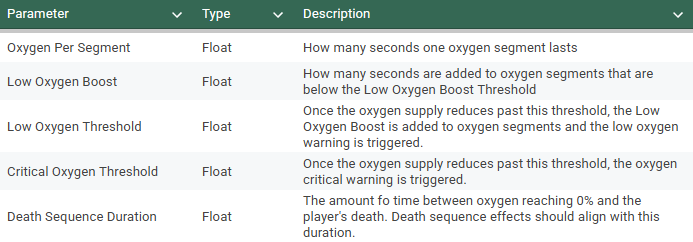
Segments will all last the same amount of time until the supply goes below a set threshold, where a low oxygen boost will be added.
- The low oxygen boost maximizes opportunity for tense, memorable dashes back to the station.
2.2 Running out of oxygen
Once the player’s oxygen supply reaches 0, the death sequence will begin:
- A vignette will slowly close in.
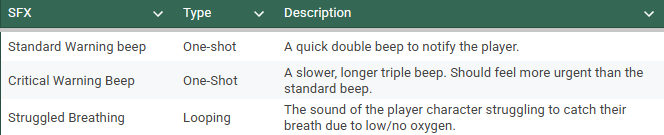
- The sound of struggling breath is heard.
- The screen fades to black.
The player can still return to the station and ultimately survive this death sequence, as long as it hasn’t reached its end.
The duration of this death sequence is exposed for tuning (see section 3).
2.3 Oxygen Supply Reduced Feedback
When an oxygen segment is removed, the player will receive feedback to draw their attention to it.
Feedback will be separated into standard and critical warnings, with critical warnings being triggered at set thresholds.
- Each critical warning is accompanied by a unique warning sign on the HUD.
- Warning signs will have different behaviours depending on the warning being given.
2.3.3 Standard Warnings
- The player hears a quick double beep
- The segment removed will flash red.
2.3.4 Critical Warnings
- The player hears a slow triple beep.
- All remaining segments will flash red.
- A warning sign will appear on the HUD. (see section 4.3 for UI Mock-ups)
The warning sign will vary depending on the critical warning threshold:

3 Parameters
4 UI
4.1 The Progress Bar
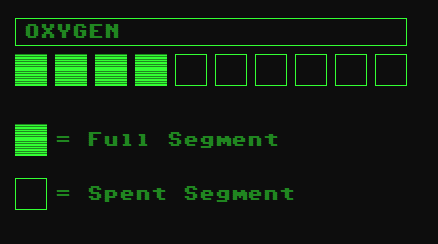
The player’s oxygen supply is represented by a segmented progress bar.
- Segments only have two visual states: Full and spent.
4.2 Remove Segment Animation
To draw attention to the progress bar when a segment is removed, the segment being removed will flash red before entering the spent state.
4.3 Critical Warnings
At certain thresholds, critical warnings will be triggered (see section 2.3 for details).
- Critical warnings draw extra attention by flashing all remaining segments red.
- Critical warnings also add a warning sign to the HUD, with contents and behaviour varying based on the critical warning being given.
4.4 Death Sequence Vignette/Fade
When the death sequence is triggered (see section 2.2), the player’s vision will start to fade. This can be achieved with a closing in vignette and/or a slow fade to black.
This effect’s duration will need to be aligned with the duration of the death sequence, ensuring the player can still see some amount until the game is actually over.
5 SFX
- The player will hear SFX when being given standard and critical warnings (see section 2.3).
- During the death sequence (see section 2.2), the player will hear the sound of their character struggling to breathe.